Yeah! I am saying it. I don't mind saying this because as far as i can remember, a good part of my computer experience has been on windows operating systems.
And I love these guys. For what people appreciate Apple for their iDevices, was the same love i share for Microsoft when it comes to their operating system.
Beg or steal.. these guys pretty much set the standard for what the graphical UI you and i know that is today.
Of course, they are commercial and they are not open as Linux.. but that doesn't make them evil. But i do know instances where these guys showed their dark side (killing Netscape.. which again i think is back in a different avatar as FireFox) for which i hate them a lot.
Most of their products right from Windows OS, Office Suite, Exchange/Outlook, etc. (hope this not the entire list :)) ) have set a different standard for usability and convenience.
Ok.. So why am i telling all this.. its because i am concerned about the direction in which they are heading. But again, what am i concerned about here.
The concern is that i am not sure if I am ready for any other products apart from the ones mentioned above, for my day to day use. Comeon folks, Apple iPad is much more closed than Windows, Google wants me to use web a lot and Linux is still not ready for mainstream retail use.
I have been techie enough to be branded as a geek. I have built my own distros of Linux and hacked stuff. But still i love Microsoft's products for the sheer pleasure of using them. The difference is that of being a TV Electronics repair guy and the same guy watching TV at the end of the day sipping hot coffee!
You might be wondering what the hell is wrong with me while Microsoft is still here doing just fine. Believe me.. Microsoft is still here.. but i am not sure if they are ready for tomorrow.
Well the trigger for this post was this post here by Russell Beattie - The end of WIMP and rise of Touch. This trigger was backed by a slow build up of frustration on Microsoft's misfirings with their products' strategy.
These guys have lost focus on some of their products. The most important of them of all was Internet Explorer. Having killed Netscape, it was the end of fun and of course business. With literally no competition until FireFox and Chrome actually munched away a good portion of the browser pie. This was too much of a oversight on Microsoft's part.
Browser is the window to a whole new world of connectedness. Children of this generation take this one product/application for granted.
How could you lose sight of a product so important and waiting until guys like Google and Apple to actually catch up with you!!
There has been a steady downfall in terms of their product quality and usability since IE6. I guess a bit of branding change with a serious effort to revamp their technology should do the trick of winning back customers.
With Companies like Apple and Google who are changing the rules of the game by winning customers over by bringing in disruptive technologies (examples: search and iPhone) which have great usability and performance, its time for Microsoft to start taking its products seriously.
The next most important product of all, Microsoft Windows Operating System. Windows has not been doing well since XP. Vista has been good for me though, but a lot of things had gone wrong in Vista too. Customer Expectations, bad PR and negative press/blog coverage did take its toll. Though i haven't used Windows 7 myself, i do hear great reviews from the blogosphere and that its usability is same as, if not better than, Apple Mac OS.
But as Russell Beattie has mentioned in his post, the future is moving towards Tablets which obviously will use touch as the preferred (or the only) interface. I am not confident that Windows is ready as a tablet OS.
Again, I don't think its too late for Microsoft. If it can regroup and focus correct, it can do a great job of coming with a tablet version of its OS. Look at the Apple. I came up with a totally different UI and Usability for its iPad. That should be the approach for Microsoft as well.
The next biggest goof up was with Windows Mobile. In all practical sense, there is no way Microsoft can do anything about it now, unless and until it was do something as drastic as giving away its Mobile OS to OEMs for free and think of a different business model around it.
Guys @ Microsoft.. you are making mistake after mistake and I hope you correct yourself soon. Again i am big fan of your remaining products (though I stopped using IE for many years now).
I know you guys are doing a lot to get things back on track. You are doing good with your Office suite. can see that you are regrouping in terms of your developer languages and tools. But do it fast and get your products back on track.
Showing posts with label Microsoft. Show all posts
Showing posts with label Microsoft. Show all posts
Sunday, June 20, 2010

Thursday, February 25, 2010
My (nightmare) experience moving from a Commercial Antivirus to a free one
The McAfee Antivirus (AV) subscription in my laptop expired. So I decided to try a Free Antivirus for a change, especially with news media and bloggers claiming that Free Antivirus software is as good as the established commercial AV software.
On searching the internet, I could understand that AVG Antivirus was standing out in all the reviews.
Also, in download.cnet.com was on top of the chart with 1.7 million downloads.

Naturally, I went ahead and installed AVG Antivirus. My experience with AVG-AV was very short-lived - probably for 6-8 hours.
The experience was quite normal. There were no performance lags.
But I continued searching for more information on Free AV and for more justification/consolation for using AVG-AV.
Thats when I came across a review about Microsoft Security Essentials (MSE). It was news to me that Microsoft has a free AV and even better, one of the studies claimed that MSE was as good as or in some cases even better than other established free and commercial AV. You read more about this study here and here.
I was pretty convinced with MSE and I thought I would rather go with a Microsoft product than with AVG-AV.
Now is when the trouble started for me. I started uninstalling AVG-AV. The uninstallation seemed to proceed well half way through and after which it was stuck for a very very long time. After much waiting (close to an hour) I decided to kill the uninstallation from the task manager.
After that, I checked to see if AVG-AV was still working or was it screwed by the uninstallation. It was fine. Thank God I thought.
I gave a second shot at the uninstallation and this time it was successful and I was prompted to restart the computer to complete the uninstallation.
On rebooting, I got a BSOD (Blue Screen of Death) and the system rebooted instantly. But to my shock, the laptop wasn't booting into Windows Vista and it again rebooted. This happened again. Thats when I realized the seriousness of the trouble i was into. The thought of losing all the data because of my experimentation with AV was stupid and shocking.
After coming out of the shock, I decided to choose the repair option during windows startup. It took a loooott of time to boot into the repair mode after which I got my next big surprise. It was asking me to insert the windows recovery mode CD and then proceed.
Thats when I was cursing myself for having procrastinated so long from creating this Windows Recovery CD.
Luckily, after trying the System Recovery option (without the Windows Recovery CD) which took around 10-15 mins, the system rebooted and then booted back into Windows Vista normally.
It took a lot of time. I was trying to recover my laptop from 12.00AM to 3.00AM and then slept for sometime and then again from 8.00AM to 9.00AM.
Thank God! the laptop recovered. And what a lesson it was 1) Never ever kill an uninstallation of an Antivirus software halfway through (but to some extent AVG-AV was to blame for taking so long to uninstall). 2) Always burn the OEMs Windows Recovery CD and have it handy with you for any such recovery.
After my system recovered, my installed Windows Security Essentials. WSE has been a good experience until now. Just like AVG-AV, WSE's performance has been good.
One thing I really liked about WSE is its simple user interface. Its beauty is in its simplicity. Other AVs that I have used such as Norton, McAfee and AVG-AV are intimidating for a layman user (of course I don't belong to that category.. self-appraisal :)).

And I am happy to have discovered some free AV options. I have one more laptop whose Norton subscription expires couple of months from now, after which I am thinking of installing Windows Security Essentials in that too.
Wednesday, September 10, 2008
What new in Internet Explorer 8 beta?
I had written about IE8 beta1 long time back. But never really had time to try it out until now. By now, IE8 Beta2 is out. I am not going to focus on intricacies of web standards supported by IE8 beta and I am also not going to talk about the performance improvements. So here is a layman's review of IE8 beta. In this review, I am going to revisit all the features released since beta1
I finally had the time to tryout IE8. So let me give you the verdict first and then get on explain whats news in IE8.
IE7 + Not so great features appearing to be great at first + Few good usability enhancements borrowed from others = IE8
Initial Configuration:
So below are the screenshots of the initial configuration that you would get after you finish installing IE8 and restarting the PC.

I decided to use custom settings to have more control over the configuration.

Wondering what would have been this option in case of express installation. Maybe Microsoft might have wanted to change the default search provider to anything but Google :).

Ok.. I wasn't very sure on what Accelerator providers were, so I choose the second option.

I really dint want to turn on this option due to privacy concerns. But with words like "recommended" and "malicious software"!!, Microsoft did influence me to turn this option on.

Default Browser - No thanks! for now. Now you can see something interesting here. I don't remember Microsoft ever trying to import settings from other browsers (very stubborn). The last I vaguely remember was during the Netscape days. Now I can see that Microsoft seems to have gone a bit soft or maybe going defensive. Trying to import whatever it can from my Firefox installation.


And finally I get the first page that gives me options to getting started with some of its highlight features like Accelerator and InPrivate Browsing.

And below is how the Add-ons user interface looks. From here, you can manage your toolbars, extensions, Accelerators, etc.

Webslices:
Webslices are a new feature in IE8, which allows you to subscribe to a portion of a web page. This has interesting use cases. For instance, in the below example, I can track the status of my friends in Facebook.
Similarly, in ebay for example, I can track the bidding of a particular product that I am interested in.
Webslices require the website to use special tags. And once a particular website supports the webslice syntax, you will notice a green button in the toolbar (as shown below).

And on clicking this button, a special button (more like a bookmark) appears on the toolbar. Clicking that will bring up a drop down mini windows like the one shown below.
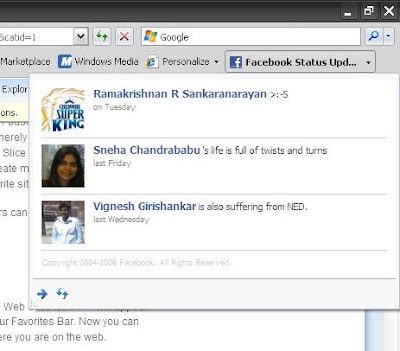
Now for users in India and especially for folks from the state of AndraPradesh, you must by proud of Eenadu (you online local daily) because of the fact that they were the only one of the 10 or so webslices currently available in the internet. I appreciate the fact that the guys running Eenadu are very advanced in trying on new stuff. Good going guys. But sad part is when I went to the Eenadu website, the green icon never glowed/appeared, so IE8 could not detect any webslice in their web site. Never mind! I anyways do not know Telugu :)

Personally speaking, this is a great idea.. but it depends on the extent to which web developers intend to support this feature. Say for example, most my favorite sites are with Google and Yahoo.. now I don't expect Google and Yahoo to support webslices. But if W3C comes with some similar standard that can be widely adopted by both web developers and browsers, then nothing like it.
For web developers and techies, you can get to know more about webslices in this MSDN link.
Accelerators:
These are context sensitive options that appear in the right-click menu option. And based on the content displayed/selected in the web page, the accelerator will display the relevant information.
For example, one of the highlighted use case is when you hover your mouse on top a address that appears in the website, a blue marker appears. Clicking that marker will show a list of accelerators. Assuming you have the Live map accelerator and you click on it, a small window appears showing the address on a map.

In the below example, I installed the wikipedia accelerator and when I select/highlight a word and launch wikipedia accelerator, a small window appears showcasing the article by that word(s). Look at the below screenshot.

Microsoft initially called this feature "Activities" and later on changed the name to its present state.
Again, web developers and techies can find more information about this feature in this MSDN link.
InPrivate Browsing:
Now that's interesting. Google's Chrome has a similar feature called Incognito.
Well, what "InPrivate Browsing" means is, when you create a new browser tab/window by selecting the "InPrivate Browsing" option, then IE8 creates a tab/windows in which you can browse as usual, but when you are finished browsing and close the tab/window, IE8 ensures to cleanup any trace of that session.. like browsing history, cookies, form data, passwords, etc.
This feature is extremely useful especially when you browse in public places like internet kiosks or in other scenarios where you share your PCs.


Now, one additional facility in IE8's private browsing option compared to Google's Chrome browser is this feature called as InPrivate Blocking. With this option, IE8 blocks content in a particular web page that is being pulled from other places and does not belong to that particular website/webserver. That does not mean that all external content is blocked. IE8 has some level intelligence in detecting which of these external content is used in your browsing behavior and to get other analytics about your usage.
What I mean by external content is that, say for example, the widgets in this blog pull contents from other web services like Google Reader, ClustrMaps, etc. Note that the examples I've quoted here are good examples of external content and these may not be necessarily blocked by "InPrivate Blocking".
IE8 also gives you better control over Deleting Browsing history in that, it lets you retain cookies and temporary internet files to a trusted website so that these sites can remember who you are are and that they load faster.

InPrivate features are a right step in the right direction for IE8. This is one of the (maybe the only one too) features that I really found useful.
But what surprises me is the fact that how come both Google and Microsoft thought of a similar feature for their browsers. Too much of a coincidence!!
You can get to know more about InPrivate features here.
Visual Search:
This is again a feature which I found very useful, where you can see images related to a particular search result while searching through the search bar. For example, the below screenshot shows the results from the New York Times site when I searched for the term Obama.

Below is another example where I change my search provider to be amazon and when i search for a particular book, I get front cover photo of the book along with the name of the book.

Suggestions:
While browsing through a particular website, if you click on the "Suggested Sites", it shows a list of similar sites. Now the suggestions were not that great. These were pretty straight forward suggestions of similar web sites. For example, while I was browsing amazon.com, the "Suggested Sites" gave the below recommendations. You are better off finding similar sites of your interest in Google than going with IE8's suggestions.

Miscellaneous:
This not so great feature of IE8 which I personally found to be very useful is the "Caret Browsing" option. There is nothing great about this feature. Its just than you enable Caret Browsing, a cursor appears in the web page which lets you scroll through the page as you would do in a word document.
This feature is very useful while copying snippets from a particular web page. You don't have to use your mouse at all. Just use Ctrl+Shift+Left/Right Arrow to select the text (as you would do in your word processor). Then just copy it (Ctrl+C) and then quickly do a Alt+Tab to choose your favorite editor that you have kept opened to paste the copied text.


IE8 has definitely taken cues from Firefox on some usability aspects and features.
For example, "Find in page" has improved. Instead of displaying a very outdated search pop-up, you get a toolbar which is less intrusive. The search matches are highlighted in yellow.
Similarly, you can reopen a tab that was closed during your current browsing session. Useful in case you want to revisit a page that you closed some time back.
IE8 also can remember you last browsing session and can reopen all the pages that you had left open during your previous session.
All of the above of very small but very important usability features borrowed from Firefox and Opera. Again, no harm and not to shy in copying such features which users take it for granted.
On a whole, the IE8 team and its product manager(s) have done a great job in terms of bringing in small usability enhancements. But in terms of new features, not many new features which will give you a Wow! feeling.
IE8 still lacks a strong platform where developers from around the world can develop rich addons. That's where Firefox scores compared to any other browser currently available. I use lot of addons which I cannot do away with. This is the kind of stickyness that IE8 and other browsers need to develop. They need to cash in on the creativity of thousands of developers around the world.
So thats about it..
And finally I manage to complete this post after 4 days.. :)
I finally had the time to tryout IE8. So let me give you the verdict first and then get on explain whats news in IE8.
IE7 + Not so great features appearing to be great at first + Few good usability enhancements borrowed from others = IE8
Initial Configuration:
So below are the screenshots of the initial configuration that you would get after you finish installing IE8 and restarting the PC.

I decided to use custom settings to have more control over the configuration.

Wondering what would have been this option in case of express installation. Maybe Microsoft might have wanted to change the default search provider to anything but Google :).

Ok.. I wasn't very sure on what Accelerator providers were, so I choose the second option.

I really dint want to turn on this option due to privacy concerns. But with words like "recommended" and "malicious software"!!, Microsoft did influence me to turn this option on.

Default Browser - No thanks! for now. Now you can see something interesting here. I don't remember Microsoft ever trying to import settings from other browsers (very stubborn). The last I vaguely remember was during the Netscape days. Now I can see that Microsoft seems to have gone a bit soft or maybe going defensive. Trying to import whatever it can from my Firefox installation.


And finally I get the first page that gives me options to getting started with some of its highlight features like Accelerator and InPrivate Browsing.

And below is how the Add-ons user interface looks. From here, you can manage your toolbars, extensions, Accelerators, etc.

Webslices:
Webslices are a new feature in IE8, which allows you to subscribe to a portion of a web page. This has interesting use cases. For instance, in the below example, I can track the status of my friends in Facebook.
Similarly, in ebay for example, I can track the bidding of a particular product that I am interested in.
Webslices require the website to use special tags. And once a particular website supports the webslice syntax, you will notice a green button in the toolbar (as shown below).

And on clicking this button, a special button (more like a bookmark) appears on the toolbar. Clicking that will bring up a drop down mini windows like the one shown below.

Now for users in India and especially for folks from the state of AndraPradesh, you must by proud of Eenadu (you online local daily) because of the fact that they were the only one of the 10 or so webslices currently available in the internet. I appreciate the fact that the guys running Eenadu are very advanced in trying on new stuff. Good going guys. But sad part is when I went to the Eenadu website, the green icon never glowed/appeared, so IE8 could not detect any webslice in their web site. Never mind! I anyways do not know Telugu :)

Personally speaking, this is a great idea.. but it depends on the extent to which web developers intend to support this feature. Say for example, most my favorite sites are with Google and Yahoo.. now I don't expect Google and Yahoo to support webslices. But if W3C comes with some similar standard that can be widely adopted by both web developers and browsers, then nothing like it.
For web developers and techies, you can get to know more about webslices in this MSDN link.
Accelerators:
These are context sensitive options that appear in the right-click menu option. And based on the content displayed/selected in the web page, the accelerator will display the relevant information.
For example, one of the highlighted use case is when you hover your mouse on top a address that appears in the website, a blue marker appears. Clicking that marker will show a list of accelerators. Assuming you have the Live map accelerator and you click on it, a small window appears showing the address on a map.

In the below example, I installed the wikipedia accelerator and when I select/highlight a word and launch wikipedia accelerator, a small window appears showcasing the article by that word(s). Look at the below screenshot.

Microsoft initially called this feature "Activities" and later on changed the name to its present state.
Again, web developers and techies can find more information about this feature in this MSDN link.
InPrivate Browsing:
Now that's interesting. Google's Chrome has a similar feature called Incognito.
Well, what "InPrivate Browsing" means is, when you create a new browser tab/window by selecting the "InPrivate Browsing" option, then IE8 creates a tab/windows in which you can browse as usual, but when you are finished browsing and close the tab/window, IE8 ensures to cleanup any trace of that session.. like browsing history, cookies, form data, passwords, etc.
This feature is extremely useful especially when you browse in public places like internet kiosks or in other scenarios where you share your PCs.


Now, one additional facility in IE8's private browsing option compared to Google's Chrome browser is this feature called as InPrivate Blocking. With this option, IE8 blocks content in a particular web page that is being pulled from other places and does not belong to that particular website/webserver. That does not mean that all external content is blocked. IE8 has some level intelligence in detecting which of these external content is used in your browsing behavior and to get other analytics about your usage.
What I mean by external content is that, say for example, the widgets in this blog pull contents from other web services like Google Reader, ClustrMaps, etc. Note that the examples I've quoted here are good examples of external content and these may not be necessarily blocked by "InPrivate Blocking".
IE8 also gives you better control over Deleting Browsing history in that, it lets you retain cookies and temporary internet files to a trusted website so that these sites can remember who you are are and that they load faster.

InPrivate features are a right step in the right direction for IE8. This is one of the (maybe the only one too) features that I really found useful.
But what surprises me is the fact that how come both Google and Microsoft thought of a similar feature for their browsers. Too much of a coincidence!!
You can get to know more about InPrivate features here.
Visual Search:
This is again a feature which I found very useful, where you can see images related to a particular search result while searching through the search bar. For example, the below screenshot shows the results from the New York Times site when I searched for the term Obama.

Below is another example where I change my search provider to be amazon and when i search for a particular book, I get front cover photo of the book along with the name of the book.

Suggestions:
While browsing through a particular website, if you click on the "Suggested Sites", it shows a list of similar sites. Now the suggestions were not that great. These were pretty straight forward suggestions of similar web sites. For example, while I was browsing amazon.com, the "Suggested Sites" gave the below recommendations. You are better off finding similar sites of your interest in Google than going with IE8's suggestions.

Miscellaneous:
This not so great feature of IE8 which I personally found to be very useful is the "Caret Browsing" option. There is nothing great about this feature. Its just than you enable Caret Browsing, a cursor appears in the web page which lets you scroll through the page as you would do in a word document.
This feature is very useful while copying snippets from a particular web page. You don't have to use your mouse at all. Just use Ctrl+Shift+Left/Right Arrow to select the text (as you would do in your word processor). Then just copy it (Ctrl+C) and then quickly do a Alt+Tab to choose your favorite editor that you have kept opened to paste the copied text.


IE8 has definitely taken cues from Firefox on some usability aspects and features.
For example, "Find in page" has improved. Instead of displaying a very outdated search pop-up, you get a toolbar which is less intrusive. The search matches are highlighted in yellow.
Similarly, you can reopen a tab that was closed during your current browsing session. Useful in case you want to revisit a page that you closed some time back.
IE8 also can remember you last browsing session and can reopen all the pages that you had left open during your previous session.
All of the above of very small but very important usability features borrowed from Firefox and Opera. Again, no harm and not to shy in copying such features which users take it for granted.
On a whole, the IE8 team and its product manager(s) have done a great job in terms of bringing in small usability enhancements. But in terms of new features, not many new features which will give you a Wow! feeling.
IE8 still lacks a strong platform where developers from around the world can develop rich addons. That's where Firefox scores compared to any other browser currently available. I use lot of addons which I cannot do away with. This is the kind of stickyness that IE8 and other browsers need to develop. They need to cash in on the creativity of thousands of developers around the world.
So thats about it..
And finally I manage to complete this post after 4 days.. :)
Friday, September 5, 2008
Bill Gates featuring in Microsoft's Ad
Hmm.. So Bill Gates is trying his hands in acting after his retirement (from active role in Microsoft).
Below is the video.
Here is the official note from Microsoft explaining its upcoming ad campaign to connect with its customers and enhance the Windows brand.
Thursday, March 13, 2008
MIX08 Microsoft Presentation - Great introduction to latest Microsoft Products
I finally managed to watch (bit by bit) the 2.5 hour video of the presentation by Microsoft at MIX08.
It was a great presentation by Microsoft on various upcoming products and releases. The presentation starts with a keynote from Ray Ozzie, Chief Software Architect, Microsoft, after which the stage is conducted by Dean Hachamovitch, General Manager Internet Explorer, and Scott Guthrie, Corporate Vice President, .NET Developer Division.
Watch the Live Streaming Keynote: Ray Ozzie, Dean Hachamovitch, and Scott Guthrie
I had covered Dean's presentation on Internet Explorer 8 in my previous blog post.
Now I had watch the rest of the video showcasing Silverlight 2.0 beta 1 and .net services. This second half of the presenation with main focus on Silverlight 2.0 beta was even more interesting and engaging than the IE8 demo. I was so thrilled by the showcasing of Silverlight 2.0 beta.
One thing is for sure.. Adobe has some serious competition for their solution for writing Rich Internet Applications (RIA) - Adobe Integrated Runtime (AIR).
Btw, I learnt from the presentation that NBC is hosting the official olympics website which is going to provide live streaming of sports events and also provide a Video-on-demand. NBC apparently has used Silverlight extensively for their web site.
NBC Olympics Player
It was a great presentation by Microsoft on various upcoming products and releases. The presentation starts with a keynote from Ray Ozzie, Chief Software Architect, Microsoft, after which the stage is conducted by Dean Hachamovitch, General Manager Internet Explorer, and Scott Guthrie, Corporate Vice President, .NET Developer Division.
Watch the Live Streaming Keynote: Ray Ozzie, Dean Hachamovitch, and Scott Guthrie
I had covered Dean's presentation on Internet Explorer 8 in my previous blog post.
Now I had watch the rest of the video showcasing Silverlight 2.0 beta 1 and .net services. This second half of the presenation with main focus on Silverlight 2.0 beta was even more interesting and engaging than the IE8 demo. I was so thrilled by the showcasing of Silverlight 2.0 beta.
One thing is for sure.. Adobe has some serious competition for their solution for writing Rich Internet Applications (RIA) - Adobe Integrated Runtime (AIR).
Btw, I learnt from the presentation that NBC is hosting the official olympics website which is going to provide live streaming of sports events and also provide a Video-on-demand. NBC apparently has used Silverlight extensively for their web site.
NBC Olympics Player
Monday, March 10, 2008
Internet Explorer 8 Beta 1 - Most Notable features


Internet Explorer 8 Beta 1 is available for download. Though this was announced last week, the news never got me excited. I was a voracious beta tester myself during my college days and I would be one of the first to try our any new release of Internet Explorer in the class or college. But offlate I never have time to do such beta testing. Even, I had time, probably the utter disappointment of Internet Explorer 7 din't excite me to try IE8. I thought, what was the big deal.. I am sure the user interface would be the same and the performance would be more bad if not same as IE7.
But my perspective/impression of Internet Explorer 8 has changed a lot (for good) after I saw Dean Hachamovitch, General Manager Internet Explorer, explain about the features of IE8 during the Mix '08 continuation of Ray Ozzie's keynote (for the less informed, Ray is the Chief Software Architect, Microsoft).
The most notable features that I liked (and also what Microsoft seems to be marketing) are: Activities, WebSlices and HTML 5 support for connection events and DOM Storage.
I would highly recommend you to watch Dean's part in the Mix '08 video. But here is the official explanation of these features.
Activities are contextual services that provide quick access to external services from any webpage. Activities typically involve one of two types of actions:
"Look up" information related to data in the current webpage
"Send" content from the current webpage to another application
Watch this demo video on Activities. This is great because it lets you do lot of activities (research/search as i would call it) with the content of a particular web page.
Coming to WebSlices, you can read this page for more details. This is a very cool feature. It lets me just keep a watch for changes/updates in particular portions of a webpage. Yes, you heard me right, I can monitor a particular portion of the web page.. think of it as an RSS for portions of a web page. My favorite WebSlice was that for Facebook where I can watch for updates from friends. Watch this video for a demo.
Users commonly visit many websites several times a day to check for updates. The introduction of RSS feeds can make this experience easier for users, although RSS feeds requires a nontrivial amount of work on behalf of the developer.
WebSlices is a new feature for websites that enables users to subscribe
to content directly within a webpage. WebSlices behave just like feeds in that
users can subscribe to them and receive update notifications when the content changes. Websites are polled at user-defined intervals, similar to the way RSS feeds are polled. Website operators may also define a minimum wait time between polls to minimize requests.
Developers can mark parts of webpages as "WebSlices" and enable users to monitor information they rely on as they move about the web. With a click in the Favorites bar, users see rich "WebSlice" visuals and developers establish a valuable, persistent end-user connection. Get started building WebSlices at the Microsoft Developer Network.
For both, Activities and Webslices, it does involve the content developers to expose the required information.
Activities for example requires the web page developer to write a very simple Activity XML. The is explained by the OpenService Format Specification (covered under the Microsoft Open Specification Promise*) which is released by Microsoft under the Creative Commons Attribution-Share Alike License (version 3.0).
Similarly, Webslices require you to write a light weight html markup. The format is again defined by WebSlice Specification (again covered under Microsoft Open Specification Promise).
Some of the other not-too-obvious and/or common-sense features that I like are the support for HTML 5 features like connnection events and DOM Storage.
Web page developers can use connection events to monitor the break in network connectivity and change the look of the page accordingly to warn the user and also change the user behavior. And using DOM Storage* you can store client specific data locally. Some of the places where it will be useful is the above example when you are about to store/post some data to a web server and the connection goes off. In which case, using DOM Storage, you can store the data locally and then post it when the connection is back online. Again, these are not my thoughts.. just explaining whatever I saw in Dean's presentation. (Btw, from John Resig's post on DOM Storage is when I got to know that Firefox was the only browser until now to support it. So Microsoft has closed that gap.)
Also, there is good support for developer tools inbuilt into IE8. You can debug a script live from within IE8 (do stuff like set breakpoints, watches, etc.) and developers can also locate and change the CSS attributes live to see how the page looks.
Okay, I am on my way to download IE8 beta1. Enjoy! :)
* - Notes
Microsoft Open Specification Promise - This is interesting. I need to do a bit more reasearch about this. Looks to me like Microsoft is trying to position itself as an Open Standards (and Interoperable) company. Good for all :).
DOM Storage - Believe me, I am not an expert in HTML 5 nor did I know about DOM Storage until I wrote this post. If you would like to know more about DOM Storage, then I suggest you read this blog post by John Resig (God bless for this nice tutorial). This post also gave me insights on how Firefox does session restoration whenever it crashes :). It actually uses DOM Storage damn it!.
Thursday, March 6, 2008
Silverlight vs Flash - War for mobile web dominance
Microsoft (Silverlight) and Adobe (Flash) are trying desperately to push their respective technologies for developing RIA (Rich Internet Applications).
Both seem to be taking this further ahead to mobile devices. Recently, Microsoft had signed a deal with Nokia to integrate Silverlight on Nokia's latest S60 based smart phones.
Adobe though having a dominance in the PC space must be doubly worried after Steve's comments on why Flash may not suited for iPhone.
I found this post from Robert Scoble providing interesting insight on why Apple may feel that Flash is not good for iPhone. More than the article, I found the user comments more intreseting.
Also, it got clear to me from the user comments that Apple was trying to port Flash 8 (and not Flash Lite - stripped down version) onto the iPhone.
Both seem to be taking this further ahead to mobile devices. Recently, Microsoft had signed a deal with Nokia to integrate Silverlight on Nokia's latest S60 based smart phones.
Adobe though having a dominance in the PC space must be doubly worried after Steve's comments on why Flash may not suited for iPhone.
I found this post from Robert Scoble providing interesting insight on why Apple may feel that Flash is not good for iPhone. More than the article, I found the user comments more intreseting.
Also, it got clear to me from the user comments that Apple was trying to port Flash 8 (and not Flash Lite - stripped down version) onto the iPhone.
Wednesday, March 5, 2008
Did you know about Microsoft Works?!
At least I dint know until few minutes back.
I had bought a new laptop recently which had a trial version of MS Office 2007. The trial version could be used without registering for not more than 25 or so tries. I had only a few tries left and hence I did not want to use it for not-so-important stuff.
So I typed "word" in Vista's start menu (for those of you haven't used vista yet, you get a nice search bar in start menu which quickly lets you search of applications in the start menu). I was hoping to see wordpad.. but something else caught my eye. There was this application called "Microsoft Works Word Processor".

What the hell was that.. I clicked it open and it threw a license agreement which I had to agree. Initially it looked very similar to "Wordpad". I thought it was a to-be replacement for "Wordpad".
But as I explored it a bit, I learnt that it was much more powerful than "Wordpad". I was thrilled because I could possibly use it as a replacement for MS Office which I was planning to buy in a few days. I was still unclear and confused what Microsoft Works Word Processor was and why would Microsoft club a powerful utility with Windows Vista (potentially canibalizing MS Office).
Quickly looking into Wikipedia, I learnt that Microsoft Works is a stand-alone mini office suite aimed at mostly non-techy folks and students. Wow.. I dint know Microsoft had a mini version of office suite. The speciality of MS Works is supposed to be its affordable price. Here is what Wikipedia says about MS Works.

There is a word processor, spreadsheet, database, calender, a common place to launch all these and a office binder kind of application.
Coming to Microsoft Works Word Processor, I read in Wikipedia that I can still open MS Office files. Thats perfect. I am going to use MS Works Word Processor for now and see if it a worthy affordable replacement for MS Office.
You can take a nice Quick Tour about Microsoft Works that can be launched from Microsoft Works Task Launcher.

Update 1:
Microsoft Works Word Processor crashes consistently whenever I copy a web page's content and try to paste on Word Processor. Thats bad :(.. Very basic stuff that a word processor (that too from Microsoft) is supposed to take care of.
I had bought a new laptop recently which had a trial version of MS Office 2007. The trial version could be used without registering for not more than 25 or so tries. I had only a few tries left and hence I did not want to use it for not-so-important stuff.
So I typed "word" in Vista's start menu (for those of you haven't used vista yet, you get a nice search bar in start menu which quickly lets you search of applications in the start menu). I was hoping to see wordpad.. but something else caught my eye. There was this application called "Microsoft Works Word Processor".

What the hell was that.. I clicked it open and it threw a license agreement which I had to agree. Initially it looked very similar to "Wordpad". I thought it was a to-be replacement for "Wordpad".
But as I explored it a bit, I learnt that it was much more powerful than "Wordpad". I was thrilled because I could possibly use it as a replacement for MS Office which I was planning to buy in a few days. I was still unclear and confused what Microsoft Works Word Processor was and why would Microsoft club a powerful utility with Windows Vista (potentially canibalizing MS Office).
Quickly looking into Wikipedia, I learnt that Microsoft Works is a stand-alone mini office suite aimed at mostly non-techy folks and students. Wow.. I dint know Microsoft had a mini version of office suite. The speciality of MS Works is supposed to be its affordable price. Here is what Wikipedia says about MS Works.
Microsoft Works is an office suite ("home productivity software suite") available from Microsoft. Smaller, less expensive with fewer features than the Microsoft Office suite, its core functionality includes a word processor, a spreadsheet and a database. Newer versions have a calendar application and a dictionary while older releases included a Terminal emulator. A 'Works Portfolio' utility offers Microsoft Binder-like functionality.Now it made sense to me that my HP Laptop came pre-installed with the OEM version of Microsoft Works.
Due to its low cost ($50 retail, $10 OEMs) companies frequently pre-install Works on their consumer grade machines. Microsoft provides a converter for Office programs to open and save Works 6.0-9.0 documents.Now, I searched for "works" and the search bar of vista start menu and now I got to see the entire suite of MS Works.

There is a word processor, spreadsheet, database, calender, a common place to launch all these and a office binder kind of application.
Coming to Microsoft Works Word Processor, I read in Wikipedia that I can still open MS Office files. Thats perfect. I am going to use MS Works Word Processor for now and see if it a worthy affordable replacement for MS Office.
You can take a nice Quick Tour about Microsoft Works that can be launched from Microsoft Works Task Launcher.

Update 1:
Microsoft Works Word Processor crashes consistently whenever I copy a web page's content and try to paste on Word Processor. Thats bad :(.. Very basic stuff that a word processor (that too from Microsoft) is supposed to take care of.
Friday, February 8, 2008
Judgement Day ?
Oh.. don't worry.. I am neither John Conor nor am I Terminator Model TX-101 :)
I was referring to Michael Arrington's post where he says that today could be the day when the Yahoo board would be taking decision on the company's fate.
There are hundereds of post about the deal.. but very few post provide an interesting insight about the possible merger.. and this post is one of them.
I also found this post on PBS by Robert X. Cringely about this deal. The post is interesting because this is one of the few posts' which tells as to what led Yahoo! to its present sad state.
I was referring to Michael Arrington's post where he says that today could be the day when the Yahoo board would be taking decision on the company's fate.
There are hundereds of post about the deal.. but very few post provide an interesting insight about the possible merger.. and this post is one of them.
I also found this post on PBS by Robert X. Cringely about this deal. The post is interesting because this is one of the few posts' which tells as to what led Yahoo! to its present sad state.
Sunday, February 3, 2008
Is Google getting scared about MSFT-YHOO deal ?
It sure looks that way :)
Here is Google's official statement about the proposed MSFT-YHOO deal. As you can see from the statement, Google is warning users of unethical and closed practices of Microsoft to creep into the internet world as well.
Here is Google's official statement about the proposed MSFT-YHOO deal. As you can see from the statement, Google is warning users of unethical and closed practices of Microsoft to creep into the internet world as well.
Could Microsoft now attempt to exert the same sort of inappropriate and illegal influence over the Internet that it did with the PC? While the Internet rewards competitive innovation, Microsoft has frequently sought to establish proprietary monopolies -- and then leverage its dominance into new, adjacent markets.The statement also clearly tells you what Google is so scared about.. you guessed it - Email & IM.
In addition, Microsoft plus Yahoo! equals an overwhelming share of instant messaging and web email accounts. And between them, the two companies operate the two most heavily trafficked portals on the Internet. Could a combination of the two take advantage of a PC software monopoly to unfairly limit the ability of consumers to freely access competitors' email, IM, and web-based services? Policymakers around the world need to ask these questions -- and consumers deserve satisfying answers.Now why would Microsoft keep quite when they see that Google is creating a negative PR for them. So here is Microsoft's official statement against Google. But its not entirely intended against Google. Also, the statement is a bit gentle.
Today, Google is the dominant search engine and advertising company on the Web. Google has amassed about 75 percent of paid search revenues worldwide and its share continues to grow. According to published reports, Google currently has more than 65 percent search query share in the U.S. and more than 85 percent in Europe. Microsoft and Yahoo! on the other hand have roughly 30 percent combined in the U.S. and approximately 10 percent combined in Europe.Here is a post from Michael Arrington about Google's stand on the proposed deal.
Friday, February 1, 2008
Microsoft to take over Yahoo!!!
Wow!!.. This would be one hell of a merger. Microsoft gave a press release on its intent to buy Yahoo! for $44.6 billion ($31/share).
Think about the kind of services that Microsoft would be acquiring.. along with a huge customer base. Very good potential to upsell or promote Microsoft products and services.
As Long Zheng listed out.. there is a huge overlap of web services between Yahoo! and Microsoft. Would be interesting to see how Microsoft goes about consolidating these services if this acquisition becomes a relality.
Coming back to Microsoft's press release.. if you had read Steve Ballmer's letter to Yahoo Board of Directors, you can feel a threatening tone in it.. This is what the letter says:
You can get more insight about this news in this post in The New York Times.
My personal feeling is that.. Yahoo! is not doing very good. In fact, its dying slowly. It is better that it gets acquired by Microsoft.. better for the company and its shareholders.
Think about the kind of services that Microsoft would be acquiring.. along with a huge customer base. Very good potential to upsell or promote Microsoft products and services.
As Long Zheng listed out.. there is a huge overlap of web services between Yahoo! and Microsoft. Would be interesting to see how Microsoft goes about consolidating these services if this acquisition becomes a relality.
Coming back to Microsoft's press release.. if you had read Steve Ballmer's letter to Yahoo Board of Directors, you can feel a threatening tone in it.. This is what the letter says:
Depending on the nature of your response, Microsoft reserves the right to pursue all necessary steps to ensure that Yahoo!’s shareholders are provided with the opportunity to realize the value inherent in our proposal.And this how it translates to.. :)
Guys.. dont give a bullshit answer. If you don't want to be acquired, then we'll take it up with the shareholders.
You can get more insight about this news in this post in The New York Times.
My personal feeling is that.. Yahoo! is not doing very good. In fact, its dying slowly. It is better that it gets acquired by Microsoft.. better for the company and its shareholders.
Sunday, December 30, 2007
Google & Microsoft - Fight for the browser's default search engine
Very interesting and funny.. the way Google and Microsoft fight over whose search engine should be used by default.
I am installing Windows Live utilities to try them out. The only windows live utility that I've tried earlier is the Windows Live Writer - an offline blog editor which lets you type, format and post the message onto most of the famous blogging services like Blogger, Wordpress, Typepad, etc.
Its a very impressive tool, especially for people who want to compose their thought offline and then post them when they are connected.
So, while installing Windows Live utilities, I got this conflict (see the image below) where Google was preventing MS from changing the default search engine settings.

Very thoughtful of Google to anticipate that someone (oh.. come on they know its MS) would change the default search engine settings and Its nice on Microsoft's part to not force Windows Live Search onto users even though Internet Explorer belongs to them.
Tuesday, December 18, 2007
War of Two Gaints - Microsoft vs Google
I would highly recommend you reading this article in The New York Times which explains in detail the different dimensions of the cold war going on between Microsoft and Google.
Both are loaded with cash and both trying to venture into each others space. While Microsoft is trying to make it big in Search and Advertising (but still without success), Google is attacking right in the heart of Microsoft's strong holds - their Operating System (OS) and Office Suite.
Article explains as to who Google is trying to venture in the OS domain by recently announcing the Android platform which directly competes with Windows Mobile OS and how Google Docs may threaten MS-Office.
Article, very informative and gives lot of insight on what the top execs at both the companies might be worried about each other.
Both are loaded with cash and both trying to venture into each others space. While Microsoft is trying to make it big in Search and Advertising (but still without success), Google is attacking right in the heart of Microsoft's strong holds - their Operating System (OS) and Office Suite.
Article explains as to who Google is trying to venture in the OS domain by recently announcing the Android platform which directly competes with Windows Mobile OS and how Google Docs may threaten MS-Office.
Article, very informative and gives lot of insight on what the top execs at both the companies might be worried about each other.
Wednesday, May 2, 2007
Windows Live Writer lost its gas ??!!
It has been 10 months since I wrote my detailed review on Windows Live Writer. Though I liked the Windows Live Writer a lot then, I never really used it for blogging actively.
After so many months, I thought I wanted to use Windows Live Writer for one very lengthy and comprehensive review of something on the web (not going to tell you what it was about :) You will have to wait to see that blog). Blogging a lengthy post staying online would take lot of time. I thought using Windows Live Writer, I could blog as and when I find time and then publish it in one shot.
But then I just remembered that my PC was reinstalled with Window XP once and I had not installed Windows Live Writer since then. So went about searching for "Windows Live Writer" on Google and came across this official blog cum home page for Windows Live Writer. I believe this is being maintained by the developers of Windows Live Writer.
Having been away from Windows Live Writer for so long I was really curious to know what was happening to this blogging client. So I clicked on this link to see their posts. To my surprise, since November 2006 there has been not a single post in their "OFFICIAL BLOG" :)
Has Microsoft realized that blogging client is by no means generating money for them. Whatever be the reason, one thing is for sure - Windows Live Writer has lost its gas and I believe you are not going to see any more releases of Windows Live Writer.
Windows Live Writer.... RIP!!
After so many months, I thought I wanted to use Windows Live Writer for one very lengthy and comprehensive review of something on the web (not going to tell you what it was about :) You will have to wait to see that blog). Blogging a lengthy post staying online would take lot of time. I thought using Windows Live Writer, I could blog as and when I find time and then publish it in one shot.
But then I just remembered that my PC was reinstalled with Window XP once and I had not installed Windows Live Writer since then. So went about searching for "Windows Live Writer" on Google and came across this official blog cum home page for Windows Live Writer. I believe this is being maintained by the developers of Windows Live Writer.
Having been away from Windows Live Writer for so long I was really curious to know what was happening to this blogging client. So I clicked on this link to see their posts. To my surprise, since November 2006 there has been not a single post in their "OFFICIAL BLOG" :)
Has Microsoft realized that blogging client is by no means generating money for them. Whatever be the reason, one thing is for sure - Windows Live Writer has lost its gas and I believe you are not going to see any more releases of Windows Live Writer.
Windows Live Writer.... RIP!!
Subscribe to:
Posts (Atom)