Showing posts with label Reviews. Show all posts

Monday, December 26, 2011

SlideIT keyboard for Android

If I were to ask you how else you would type without really typing on the keyboard, you may think hard and finally say you will voice dictate.. Thats the way Apple is taking us with Siri.

It's going to take some time before we effortlessly speak to our phones. But if you had thought there was no other way, then you need to think hard again in innovative ways again.

Please welcome SlideIT, the fun and in some aspects the easier and faster way to type.

In fact, I have been typing this post using there SlideIT keyboard! I love swiping my finger across the keyboard to type the text you want.

The concept is simple, all you need to do is connect the letters forming the word and SlideIT is smart enough to complete the word for you. The prediction is very impressive. And when you are unable swipe, you can always type like in a regular keyboard.

I am thoroughly enjoying typing in it for some time at least in this new way.

Now, some annoyances are, you'll have to remember where the keys are located in the keyboard. Second is, you can type only in one hand, which is quite obvious, but you'll have to use your index finger to type while holding the phone in there other hand, which makes it inconvenient to type while driving and similar situations!

Watch this video to see the typing in action.

http://www.youtube.com/watch?v=229U0ZYPum8&feature=youtube_gdata_player

Go ahead and try it yourself!

# tweetit

Saturday, December 24, 2011

Blogger app on Android

One of the reasons I found for writing less on my blog is due to the unavailability of my laptop.

I had two laptops and both are broke now..  My 2 year old broke them.  Even when I had them, It was used by my family. I do have an iPad, but again the same case.

I was thinking about the resolutions I had made this year (My resolutions for this year deserve their own post later) and I just realized how miserably I had failed in the one where I had promised to write at least one post a week.

The last I wrote was around 11 months back.

That was when I thought "hey, anyways my online life has moved to my android smartphone.. Why not just use it for blogging as well!" 

But long blog post are not easy on a smartphone. Smartphones are definitely useful for micro-blogging such as twitter and Facebook updates.

I found that there is an app available for Blogger and just installed it to give it a shot.

In fact, I am writing this post using it.

The app is descent enough. Doesn't have a lot of editing options though.

For example, I still haven't figured out a way to enter images between text.

Also, doesn't show my existing labels.. I will have to type them manually :-(

Definitely not easier to type long post on a smartphone. Thanks to the SwiftKey keyboard, some of the typing pain is reduced by prediction and auto-fill.

Still I think PCs are best for regular blogging. 

Now let me post this to see how this shows up in my blog!


Friday, February 25, 2011

Declutter your Harddisk using WinDirStat

With every passing month, you add so much digital clutter in your computer that it becomes an impossible task to clean up your hard disk. Forget cleanup, just trying to find out what really is eating up your storage space itself becomes a huge task.

I ran into a similar situation and that's when i decided to attack the problem no matter what.

Initially I used the most dumbest way of finding out what really was eating up space - right-click->Properties at all top-level folders under c-drive and then further drill down in a similar fashion.

I thought I will quickly identify that one folder that really is eating up space. It took half-hour to realize how scattered all my files (photos, videos, music, installables, pdfs, documents, etc.) were.

I was wondering how easy it would have been had this been Linux - just run the "du" (disk-usage) command and figure out whats eating up

Ah, thats it.. install cygwin and that will let me run this command.  But it really wasn't worth installing hundreds of MB of cygwin data just to analyse disk usage. So, I started searching for a standalone windows based tool that will give me disk usage stats, which led me to this post in lifehacker which introduced me to WinDirStat.

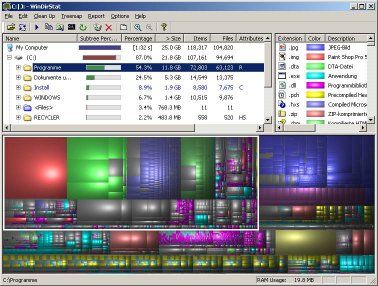
Its one of the best system tools that I have come across for the windows OS, which lets you visualize your hard disk. And what a nice way of visualizing your hard disk - elegant and brilliant.

Hover your mouse pointer on top of one of these colored blocks and the status bar below will show the filename along with its complete path. And click the block to ready locate the file and do whatever you want, including deleting this file from your hard disk.

Its an amazing tool to start visualizing your hard disk and start attacking all that clutter. Btw, I also found this tool useful for locating some long lost videos, mp3s and jpegs.

There is also a tree-map view and file types view which are visible by default. The file types view is really useful as it tells you what type of  file is occupying how much. In my case, clearly all the videos, mp3s and jpegs were eating up all the space. All I had to do was back them up in an external hard disk.

So, go ahead and clean up that clutter.

PS: I read later that WinDirStat was inspired by KDirStat which is the KDE-Linux version of the same tool. Cool! :)


#tweetit

Thursday, February 25, 2010

My (nightmare) experience moving from a Commercial Antivirus to a free one

The McAfee Antivirus (AV) subscription in my laptop expired. So I decided to try a Free Antivirus for a change, especially with news media and bloggers claiming that Free Antivirus software is as good as the established commercial AV software.

On searching the internet, I could understand that AVG Antivirus was standing out in all the reviews.

Also, in download.cnet.com was on top of the chart with 1.7 million downloads.


Naturally, I went ahead and installed AVG Antivirus. My experience with AVG-AV was very short-lived - probably for 6-8 hours.

The experience was quite normal. There were no performance lags.

But I continued searching for more information on Free AV and for more justification/consolation for using AVG-AV.

Thats when I came across a review about Microsoft Security Essentials (MSE). It was news to me that Microsoft has a free AV and even better, one of the studies claimed that MSE was as good as or in some cases even better than other established free and commercial AV. You read more about this study here and here.

I was pretty convinced with MSE and I thought I would rather go with a Microsoft product than with AVG-AV.

Now is when the trouble started for me. I started uninstalling AVG-AV. The uninstallation seemed to proceed well half way through and after which it was stuck for a very very long time. After much waiting (close to an hour) I decided to kill the uninstallation from the task manager.

After that, I checked to see if AVG-AV was still working or was it screwed by the uninstallation. It was fine. Thank God I thought.

I gave a second shot at the uninstallation and this time it was successful and I was prompted to restart the computer to complete the uninstallation.

On rebooting, I got a BSOD (Blue Screen of Death) and the system rebooted instantly. But to my shock, the laptop wasn't booting into Windows Vista and it again rebooted. This happened again. Thats when I realized the seriousness of the trouble i was into. The thought of losing all the data because of my experimentation with AV was stupid and shocking.

After coming out of the shock, I decided to choose the repair option during windows startup. It took a loooott of time to boot into the repair mode after which I got my next big surprise. It was asking me to insert the windows recovery mode CD and then proceed.

Thats when I was cursing myself for having procrastinated so long from creating this Windows Recovery CD.

Luckily, after trying the System Recovery option (without the Windows Recovery CD) which took around 10-15 mins, the system rebooted and then booted back into Windows Vista normally.

It took a lot of time. I was trying to recover my laptop from 12.00AM to 3.00AM and then slept for sometime and then again from 8.00AM to 9.00AM.

Thank God! the laptop recovered. And what a lesson it was 1) Never ever kill an uninstallation of an Antivirus software halfway through (but to some extent AVG-AV was to blame for taking so long to uninstall). 2) Always burn the OEMs Windows Recovery CD and have it handy with you for any such recovery.

After my system recovered, my installed Windows Security Essentials. WSE has been a good experience until now. Just like AVG-AV, WSE's performance has been good.

One thing I really liked about WSE is its simple user interface. Its beauty is in its simplicity. Other AVs that I have used such as Norton, McAfee and AVG-AV are intimidating for a layman user (of course I don't belong to that category.. self-appraisal :)).


And I am happy to have discovered some free AV options. I have one more laptop whose Norton subscription expires couple of months from now, after which I am thinking of installing Windows Security Essentials in that too.


Sunday, March 8, 2009

GoodReads.com - Nice site for book lovers

I just enrolled myself in this site.

Very nice site to share your views on books with like minded readers.

Visit the site to know more about it!

I just wrote a very short review of a not so great book - "The Davinci Code" in this site.

The Da Vinci Code The Da Vinci Code by Dan Brown


My review


rating: 4 of 5 stars
The storyline is unique, interesting and fast moving. Its gets slow though later in the book.


View all my reviews.

Tuesday, October 21, 2008

Blackberry Storm - My thoughts


I had been waiting to publish this post on Storm ever since its user guide had leaked on the net and lots of post started appearing on in the blogosphere. And now news is out that Verizon Wireless is launching it.

I think, the phone looks amazing and I have seen the video of the Storm in action (look at the video at the end of this post) and its impressive.

My personal take is, Verizon+Storm is going to be more successful at the enterprise level (and that really matters) because of Blackberry's reputation and acceptance in businesses across the world. I think many agree with me.

One of the biggest concerns with using smart phones (which are naturally glued with a camera - phone manufacturers never care about folks who don't need a camera) nowadays is that we need to carry them to our offices and camera phones a big NO NO. But what I came to know from one of the person in my office (not very sure if thats true) is that the camera on the Storm (and other blackberry devices) can be controlled from a central location. Wow!.. organizations are going to be OK with that and i am double OK with that too. I can't do that with iPhone today.

Talking about Storm and iPhone, here is an article comparing both.

And on an separate note, it seems that Blackberry is also launching an AppStore.. heard of app store some where.. :).. thats what everyone is launching nowadays.. Apple iPhone, Google Android, et al.

Alright, enjoy the video..


Update: Oct 29, 2008
Check out this post in GigaOM - Why BlackBerry Storm Is An iPhone (and G-1) Killer. Reiterates my thoughts.

Tuesday, October 7, 2008

Nokia's answer to iPhone - Tube

I am happy to see the detailed video review of Nokia's Tube (5800 XpressMusic) in Engadget.

Like everyone, i have been a loyal Nokia fan for years and off late, my skepticism on Nokia's smartphones was also clarified after I bought a Nokia E61. My E61 has been the best phone ever I had got till date. And Symbian s60 is the best OS ever.

Looking at the videos, I am sure Nokia's Tube will be a huge success, if not for touchscreen, but at least for the features packed in it and for usability sake.

You may refer to this link to read through the specifications of this phone.


Thursday, October 2, 2008

Nintendo DSi Video - With dual camera

If you are a hardcore gamer, then you may already know by now that Nintendo has released its next generation handheld gaming console - Nintendo DSi

This one looks just the DS physically, but with dual cameras. Engadget claims that it is much slimmer than the previous one.

You may find the review of DSi in the below links interesting. Below that is a video of DSi featuring some capabilities of the kind of games that it was host and its touch screen functionality.

http://www.engadget.com/2008/10/02/nintendo-announces-the-dsi/
http://kotaku.com/5057870/nintendo-announce-new-ds-the-nintendo-dsi


I also found this side-by-side comparison of PSP, DSi and iPhone hardware specs interesting.


PS: One a total unrelated and stupid note from me, I dont know why they add a post fix "i" when they add a camera to the existing model - DS => DSi. The same happened with Nokia E61i (which is same as Nokia E61, the one that I have currently, but with a added camera).

Saturday, September 20, 2008

Screenshots of Windows 7 Engineering build

If you want to know how the next version of windows is going to look like, then you can look at this site where snapshots of the next generation windows (named Windows 7) have been posted.

I did not find any big deviation from Windows Vista except for changes in the look'n'feel of applications like calculator, wordpad and paint. All of these have their menus looking like that of Office 2007.

I am sure there must be a lot cooking than improvements to these utility applications.

Below is a video of how the calculator looks in this engineering build of Windows 7.

Wednesday, September 10, 2008

What new in Internet Explorer 8 beta?

I had written about IE8 beta1 long time back. But never really had time to try it out until now. By now, IE8 Beta2 is out. I am not going to focus on intricacies of web standards supported by IE8 beta and I am also not going to talk about the performance improvements. So here is a layman's review of IE8 beta. In this review, I am going to revisit all the features released since beta1

I finally had the time to tryout IE8. So let me give you the verdict first and then get on explain whats news in IE8.

IE7 + Not so great features appearing to be great at first + Few good usability enhancements borrowed from others = IE8

Initial Configuration:

So below are the screenshots of the initial configuration that you would get after you finish installing IE8 and restarting the PC.


I decided to use custom settings to have more control over the configuration.


Wondering what would have been this option in case of express installation. Maybe Microsoft might have wanted to change the default search provider to anything but Google :).


Ok.. I wasn't very sure on what Accelerator providers were, so I choose the second option.


I really dint want to turn on this option due to privacy concerns. But with words like "recommended" and "malicious software"!!, Microsoft did influence me to turn this option on.


Default Browser - No thanks! for now. Now you can see something interesting here. I don't remember Microsoft ever trying to import settings from other browsers (very stubborn). The last I vaguely remember was during the Netscape days. Now I can see that Microsoft seems to have gone a bit soft or maybe going defensive. Trying to import whatever it can from my Firefox installation.


And finally I get the first page that gives me options to getting started with some of its highlight features like Accelerator and InPrivate Browsing.


And below is how the Add-ons user interface looks. From here, you can manage your toolbars, extensions, Accelerators, etc.


Webslices:

Webslices are a new feature in IE8, which allows you to subscribe to a portion of a web page. This has interesting use cases. For instance, in the below example, I can track the status of my friends in Facebook.

Similarly, in ebay for example, I can track the bidding of a particular product that I am interested in.

Webslices require the website to use special tags. And once a particular website supports the webslice syntax, you will notice a green button in the toolbar (as shown below).


And on clicking this button, a special button (more like a bookmark) appears on the toolbar. Clicking that will bring up a drop down mini windows like the one shown below.
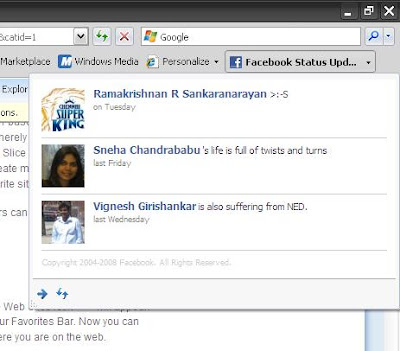


Now for users in India and especially for folks from the state of AndraPradesh, you must by proud of Eenadu (you online local daily) because of the fact that they were the only one of the 10 or so webslices currently available in the internet. I appreciate the fact that the guys running Eenadu are very advanced in trying on new stuff. Good going guys. But sad part is when I went to the Eenadu website, the green icon never glowed/appeared, so IE8 could not detect any webslice in their web site. Never mind! I anyways do not know Telugu :)


Personally speaking, this is a great idea.. but it depends on the extent to which web developers intend to support this feature. Say for example, most my favorite sites are with Google and Yahoo.. now I don't expect Google and Yahoo to support webslices. But if W3C comes with some similar standard that can be widely adopted by both web developers and browsers, then nothing like it.

For web developers and techies, you can get to know more about webslices in this MSDN link.

Accelerators:

These are context sensitive options that appear in the right-click menu option. And based on the content displayed/selected in the web page, the accelerator will display the relevant information.

For example, one of the highlighted use case is when you hover your mouse on top a address that appears in the website, a blue marker appears. Clicking that marker will show a list of accelerators. Assuming you have the Live map accelerator and you click on it, a small window appears showing the address on a map.


In the below example, I installed the wikipedia accelerator and when I select/highlight a word and launch wikipedia accelerator, a small window appears showcasing the article by that word(s). Look at the below screenshot.


Microsoft initially called this feature "Activities" and later on changed the name to its present state.

Again, web developers and techies can find more information about this feature in this MSDN link.

InPrivate Browsing:

Now that's interesting. Google's Chrome has a similar feature called Incognito.

Well, what "InPrivate Browsing" means is, when you create a new browser tab/window by selecting the "InPrivate Browsing" option, then IE8 creates a tab/windows in which you can browse as usual, but when you are finished browsing and close the tab/window, IE8 ensures to cleanup any trace of that session.. like browsing history, cookies, form data, passwords, etc.

This feature is extremely useful especially when you browse in public places like internet kiosks or in other scenarios where you share your PCs.


Now, one additional facility in IE8's private browsing option compared to Google's Chrome browser is this feature called as InPrivate Blocking. With this option, IE8 blocks content in a particular web page that is being pulled from other places and does not belong to that particular website/webserver. That does not mean that all external content is blocked. IE8 has some level intelligence in detecting which of these external content is used in your browsing behavior and to get other analytics about your usage.

What I mean by external content is that, say for example, the widgets in this blog pull contents from other web services like Google Reader, ClustrMaps, etc. Note that the examples I've quoted here are good examples of external content and these may not be necessarily blocked by "InPrivate Blocking".

IE8 also gives you better control over Deleting Browsing history in that, it lets you retain cookies and temporary internet files to a trusted website so that these sites can remember who you are are and that they load faster.


InPrivate features are a right step in the right direction for IE8. This is one of the (maybe the only one too) features that I really found useful.

But what surprises me is the fact that how come both Google and Microsoft thought of a similar feature for their browsers. Too much of a coincidence!!

You can get to know more about InPrivate features here.

Visual Search:

This is again a feature which I found very useful, where you can see images related to a particular search result while searching through the search bar. For example, the below screenshot shows the results from the New York Times site when I searched for the term Obama.


Below is another example where I change my search provider to be amazon and when i search for a particular book, I get front cover photo of the book along with the name of the book.


Suggestions:

While browsing through a particular website, if you click on the "Suggested Sites", it shows a list of similar sites. Now the suggestions were not that great. These were pretty straight forward suggestions of similar web sites. For example, while I was browsing amazon.com, the "Suggested Sites" gave the below recommendations. You are better off finding similar sites of your interest in Google than going with IE8's suggestions.


Miscellaneous:

This not so great feature of IE8 which I personally found to be very useful is the "Caret Browsing" option. There is nothing great about this feature. Its just than you enable Caret Browsing, a cursor appears in the web page which lets you scroll through the page as you would do in a word document.

This feature is very useful while copying snippets from a particular web page. You don't have to use your mouse at all. Just use Ctrl+Shift+Left/Right Arrow to select the text (as you would do in your word processor). Then just copy it (Ctrl+C) and then quickly do a Alt+Tab to choose your favorite editor that you have kept opened to paste the copied text.


IE8 has definitely taken cues from Firefox on some usability aspects and features.

For example, "Find in page" has improved. Instead of displaying a very outdated search pop-up, you get a toolbar which is less intrusive. The search matches are highlighted in yellow.

Similarly, you can reopen a tab that was closed during your current browsing session. Useful in case you want to revisit a page that you closed some time back.

IE8 also can remember you last browsing session and can reopen all the pages that you had left open during your previous session.

All of the above of very small but very important usability features borrowed from Firefox and Opera. Again, no harm and not to shy in copying such features which users take it for granted.

On a whole, the IE8 team and its product manager(s) have done a great job in terms of bringing in small usability enhancements. But in terms of new features, not many new features which will give you a Wow! feeling.

IE8 still lacks a strong platform where developers from around the world can develop rich addons. That's where Firefox scores compared to any other browser currently available. I use lot of addons which I cannot do away with. This is the kind of stickyness that IE8 and other browsers need to develop. They need to cash in on the creativity of thousands of developers around the world.

So thats about it..

And finally I manage to complete this post after 4 days.. :)

Monday, March 10, 2008

Internet Explorer 8 Beta 1 - Most Notable features


Internet Explorer 8 Beta 1 is available for download. Though this was announced last week, the news never got me excited. I was a voracious beta tester myself during my college days and I would be one of the first to try our any new release of Internet Explorer in the class or college. But offlate I never have time to do such beta testing. Even, I had time, probably the utter disappointment of Internet Explorer 7 din't excite me to try IE8. I thought, what was the big deal.. I am sure the user interface would be the same and the performance would be more bad if not same as IE7.

But my perspective/impression of Internet Explorer 8 has changed a lot (for good) after I saw Dean Hachamovitch, General Manager Internet Explorer, explain about the features of IE8 during the Mix '08 continuation of Ray Ozzie's keynote (for the less informed, Ray is the Chief Software Architect, Microsoft).
The most notable features that I liked (and also what Microsoft seems to be marketing) are: Activities, WebSlices and HTML 5 support for connection events and DOM Storage.

I would highly recommend you to watch Dean's part in the Mix '08 video. But here is the official explanation of these features.

Activities are contextual services that provide quick access to external services from any webpage. Activities typically involve one of two types of actions:
"Look up" information related to data in the current webpage
"Send" content from the current webpage to another application
Watch this demo video on Activities. This is great because it lets you do lot of activities (research/search as i would call it) with the content of a particular web page.

Coming to WebSlices, you can read this page for more details. This is a very cool feature. It lets me just keep a watch for changes/updates in particular portions of a webpage. Yes, you heard me right, I can monitor a particular portion of the web page.. think of it as an RSS for portions of a web page. My favorite WebSlice was that for Facebook where I can watch for updates from friends. Watch this video for a demo.

Users commonly visit many websites several times a day to check for updates. The introduction of RSS feeds can make this experience easier for users, although RSS feeds requires a nontrivial amount of work on behalf of the developer.

WebSlices is a new feature for websites that enables users to subscribe
to content directly within a webpage. WebSlices behave just like feeds in that
users can subscribe to them and receive update notifications when the content changes. Websites are polled at user-defined intervals, similar to the way RSS feeds are polled. Website operators may also define a minimum wait time between polls to minimize requests.

Developers can mark parts of webpages as "WebSlices" and enable users to monitor information they rely on as they move about the web. With a click in the Favorites bar, users see rich "WebSlice" visuals and developers establish a valuable, persistent end-user connection.
Get started building WebSlices at the Microsoft Developer Network.

For both, Activities and Webslices, it does involve the content developers to expose the required information.

Activities for example requires the web page developer to write a very simple Activity XML. The is explained by the OpenService Format Specification (covered under the Microsoft Open Specification Promise*) which is released by Microsoft under the Creative Commons Attribution-Share Alike License (version 3.0).

Similarly, Webslices require you to write a light weight html markup. The format is again defined by WebSlice Specification (again covered under Microsoft Open Specification Promise).

Some of the other not-too-obvious and/or common-sense features that I like are the support for HTML 5 features like connnection events and DOM Storage.

Web page developers can use connection events to monitor the break in network connectivity and change the look of the page accordingly to warn the user and also change the user behavior. And using DOM Storage* you can store client specific data locally. Some of the places where it will be useful is the above example when you are about to store/post some data to a web server and the connection goes off. In which case, using DOM Storage, you can store the data locally and then post it when the connection is back online. Again, these are not my thoughts.. just explaining whatever I saw in Dean's presentation. (Btw, from John Resig's post on DOM Storage is when I got to know that Firefox was the only browser until now to support it. So Microsoft has closed that gap.)

Also, there is good support for developer tools inbuilt into IE8. You can debug a script live from within IE8 (do stuff like set breakpoints, watches, etc.) and developers can also locate and change the CSS attributes live to see how the page looks.

Okay, I am on my way to download IE8 beta1. Enjoy! :)


* - Notes


Microsoft Open Specification Promise - This is interesting. I need to do a bit more reasearch about this. Looks to me like Microsoft is trying to position itself as an Open Standards (and Interoperable) company. Good for all :).


DOM Storage - Believe me, I am not an expert in HTML 5 nor did I know about DOM Storage until I wrote this post. If you would like to know more about DOM Storage, then I suggest you read this blog post by John Resig (God bless for this nice tutorial). This post also gave me insights on how Firefox does session restoration whenever it crashes :). It actually uses DOM Storage damn it!.

Sunday, November 18, 2007

Redefining books - E-Reader from Amazon

I read this news in Newsweek about this e-reader from Amazon called as "Kindle".

Kindle is a physical electronic device which of size of a book. It can store and display pages of books for you to read. That's why it is called a e-reader.


The beauty of this e-reader is that it can store thousands of books for you to read at your leisure. Not just that, you can subscribe to news papers and magazines and read them on this e-reader.

Kindle also has internet capabilities and lets you search the net and go through wikipedia and things like that.

Now, you must be thinking as to how good/pleasurable will it be to read a book on a device. But it seems that the device uses a technology called E-Ink which renders the text on the screen very similar and close to a printed paper. So it looks like printed paper and feels like printed paper. Below is a short description of E-Ink which I took from the Newsweek article.

This decade's major breakthrough has been the introduction of E Ink, whose creators came out of the MIT Media Lab. Working sort of like an Etch A Sketch, it forms letters by rearranging chemicals under the surface of the screen, making a page that looks a lot like a printed one. The first major implementation of E Ink was the $299 Sony Reader, launched in 2006 and heavily promoted. Sony won't divulge sales figures, but business director Bob Nell says the Reader has exceeded the company's expectations, and earlier this fall Sony introduced a sleeker second-generation model, the 505. (The Reader has no wireless—you must download on your computer and then move it to the device— and doesn't enable searching within a book.)
Oh yes.. Kindle is not the first device of its kind. Sony has done it before.

In my opinion, what matters is that the publishing industry should form an open standard format which can be then published on to e-reader's like Kindle (it may already be the case even now.. i don't know).

E-reader is something I have already thought of since many years. It will be the next great breakthrough. Think about it. School children don't have to carry so many books. And why would you want to give a cheap laptop to a child. Give them a e-reader like kindle which will contain all the book the kind ever needs. This will expand the kids knowledge.

I am definitely looking forward to buying this the next time I end up in US.

And hey.. there are two things I could realize from what Amazon is trying to do.

First, the world is moving towards convergence. Kindle with its internet capabilities is already a sort of handheld PDA. Now even other PDAs like iPhone could support such e-reader capabilities.

Second, now isn't it interesting to note that Amazon is also becoming a product company. Now this is what in my opinion I would term as "Business Convergence". The line between services and product companies is disappearing.

Btw, read the Newsweek article. Its a painfully long article but with lot of insight.

And also you can read the device's review at Engadget.

Friday, October 12, 2007

Mobile platform-specific Google Maps!!

Wow.. finally Google Maps specifically created for S60 Symbian platform.

Here are some screenshots of the new Google Maps installed on my Nokia E61 :).


By the way, I found this review at All About Symbian about the new Google Maps very useful.

I knew this would eventually happen. This is what I was suggesting to Schrep in my comments to his post. I was mentioning about my thoughts on how Firefox for mobile phones should follow a strategy where first they come up with a Java based firefox so that they can capture the mass market and then they followup with a platform specific firefox application which gives a better performance.

Now, Google did just that. They first came up with a java-based Google Maps. This ensured that most of the phones start using Google Maps (capture the mass market). Now they've come up with a platform-specific Google Map which is available for Windows Mobile, Palm OS, Symbian and Blackberry, which gives a better performance and also utilize phone-specific features. For example, the new Google Map uses the phones' GPS if that's available. So if you install the new Google Maps on your Nokia N95, then it will automatically use the inbuilt GPS to show your location on the map.

For those who are not familiar with mobile applications.. what this means is that the previously available Google Map application (software) for the mobile phones was written (developed) using Java. Which means any Java enabled phone was install and use Google Maps on their phone. So you must be asking whats the big deal about Google Maps now?!!

Well, any Java-based application runs on top of the Java Virtual Machine (JVM) which in turn runs on top of the mobile OS (platform). Which means there will be a comparable difference in performance between a Java-based application and a platform-specific application. Obviously, platform-specific applications are must faster. Also, developing mobile applications using the platform specific APIs (Application Programming Interface) will let us utilize any in-built phone features like GPS (as I've mentioned above).

Friday, September 21, 2007

Top Sites from Alexa

Similar to PC Magazine's rating of top sites.. Alexa's rating of top sites is also good. But these top 100 websites have repeated local versions of a particular web  sites. Especially true for local version of google home page (from india, japan, UAE, etc.) appearing in the top 100 listing. 

PC Magazine's Top Web Sites of 2007

The PC Magazine's Top Web Sites of 2007 is very good. The rating of top sites is very relevant and the list has sites that I thought should be top.

The web site rating has been split into two at a very high level into Top 100 Classic Web Sites and Top  100  undiscovered Web Sites.

Interesting !!

Wednesday, May 2, 2007

Windows Live Writer lost its gas ??!!

It has been 10 months since I wrote my detailed review on Windows Live Writer. Though I liked the Windows Live Writer a lot then, I never really used it for blogging actively.

After so many months, I thought I wanted to use Windows Live Writer for one very lengthy and comprehensive review of something on the web (not going to tell you what it was about :) You will have to wait to see that blog). Blogging a lengthy post staying online would take lot of time. I thought using Windows Live Writer, I could blog as and when I find time and then publish it in one shot.

But then I just remembered that my PC was reinstalled with Window XP once and I had not installed Windows Live Writer since then. So went about searching for "Windows Live Writer" on Google and came across this official blog cum home page for Windows Live Writer. I believe this is being maintained by the developers of Windows Live Writer.

Having been away from Windows Live Writer for so long I was really curious to know what was happening to this blogging client. So I clicked on this link to see their posts. To my surprise, since November 2006 there has been not a single post in their "OFFICIAL BLOG" :)

Has Microsoft realized that blogging client is by no means generating money for them. Whatever be the reason, one thing is for sure - Windows Live Writer has lost its gas and I believe you are not going to see any more releases of Windows Live Writer.

Windows Live Writer.... RIP!!

Friday, March 16, 2007

300 - An amazing movie

Spoiler Warning: In my excitement about the movie, I might spill out the story of the movie '300'. Though its not a thriller of any sort, but still its good to see the story for yourself. So don't read this post if you don't want to know the story. But I can see that curiosity in your eyes :)

Today is my last day in Virginia. My business trip is over and I have a flight to catch today morning.

My friend(and colleague) and myself decided to watch 300 (the movie) as it was the last working day and we wanted de-stress ourselves. My friend had heard a lot of hype regarding the movie and he was explaining me that during the lunch time break and coincidental we also heard 2 more people talking about it nearby. Now that really triggered it and we decided to see the movie.

My friend informed me that they spent close to 75 million dollars (not sure how much was actually spent) on this. Wow, if that was a real number, then that's lot of money for a movie. So I was really curious now to see this movie.

I don't have the patience to give an overview of this movie. You can read it your self in wikipedia - 300 (film) (quoting a portion of it below)

300 is a 2007 film adaptation of the graphic novel 300 by Frank Miller, itself a loose adaptation about the Battle of Thermopylae in 480 BC. The film is directed by Zack Snyder with Frank Miller attached as an executive producer and consultant, and was shot mostly with bluescreen to duplicate the imagery of the original comic book work.

Spartan King Leonidas (Gerard Butler) and 300 Spartans fight to the last man against Persian King Xerxes (Rodrigo Santoro) and his normous army of more than one million soldiers. Facing insurmountable odds, the Spartans' sacrifice inspires all of Greece to unite against the Persian invaders. In Sparta, Queen Gorgo (Lena Headey) attempts to rally support for her husband. The story is told through narration by Dilios (David Wenham) lending the film a historical fantasy feel.

Well, in simple terms the movie is great. The story, the pace (fast), the visual effects and finally Gerard Butler's acting, everything is just great.

The story is fast paced and gripping. Most of it goes in sword fights in which these 300 greeks have against the invading persian army. Though its very fictional in the sense that 300 people reduce the 1,00,000 strong persian army to just 10,000 (if i am correct). But whatever it is, I liked the story a lot and the movie. Though the movie is a little over 2 hours, you never feel that you been sitting for too long.

A word of caution. Most of them may find the fight scenes very repulsive because of their bloody nature.

Man.. I've become a great fan of Gerard Butler. Nothing great about him nor is he a well-known actor. But he has done his job really well. And I like that.

Well it was a nice way to end the week. I am waiting to go back to Dallas now. Good bye!! Virginia :)